· 2339 words · 12 min
Tailor by Button review: I let an AI trading assistant check my oil trade
I asked Tailor, the AI assistant in the Button app, to check an oil trade. What it answered, how it sized $100 at 20x, what the order card shows, pricing and risks.
Honest review. Some links are affiliate links: same price for you, a small commission for the project.
ⓘ Paid partnership with Button. The company paid for this review and topped up my test account with $10 for the screenshots. The waitlist link below is my referral link: you get 10% off the paid plans, I get a share of the fees. None of that changed what is written here, including the parts about leverage and risk. Nothing on this page is financial advice.
Quick answer
Tailor is an AI assistant inside the Button app on iPhone that trades perpetual contracts on Hyperliquid. You type a market idea in plain words, it pulls data, argues with you, sizes the trade and prepares an order card. Nothing is placed until you confirm. In my test it refused to simply agree with a bullish oil thesis, asked whether $100 meant order value or margin, and showed the difference: $4.94 of margin at 20x versus nearly $2,000 of exposure. Access is through a waitlist right now, and the product is leveraged perps with real money, so treat it as a second opinion, not a signal service.
▶️ Prefer YouTube? I let AI check my oil trade — full video
🔗 Join the Tailor waitlist — 10% off Pro and Trader through my link
What is Tailor by Button?
Tailor is a chat-first trading assistant, and Button is the app and the company around it. You open a chat, describe what you think about a market, and Tailor researches it, tells you what it sees, proposes how to express the idea and drafts the order. The trading itself happens on Hyperliquid, the on-chain perpetuals venue, so the markets, the leverage caps and the funding rates are Hyperliquid's.
The company's own wording on button.xyz is worth quoting because it sets the boundary: "Nothing is placed until you slide, including the trades Tailor drafts for you." That matched what I saw. In three rounds of conversation the assistant never opened a position on its own.
| What the app offers | What it looked like in my test |
|---|---|
| Ask about any market in plain language | A chat tab called Tailor; answers in two to five sentences with data and a view |
| Trades drafted by the assistant | An order card with instrument, direction, size, margin and leverage, waiting for my confirmation |
| Markets | Crypto, stocks, commodities and indices as perpetual contracts; the site also lists FX |
| Feed | Calls and news tagged by market and direction, filtered by what you say you follow |
| Traders | Look up any Hyperliquid trader, see the account, get alerts when they open or close |
| Routines and alerts | Scheduled briefs and price alerts by push notification or Telegram |
I tested the chat and the market screens in depth. Routines, the Feed and trader-following I only opened; they are not part of this review.
Who is behind Button?
Button Labs raised a $5.1 million seed round in December 2025, led by Blockchain Capital, with Coinbase Ventures, Auros, FalconX, CitizenX and Flowdesk participating, according to the company's seed announcement. The post describes Button as "building Bitcoin's prime brokerage" with "credit, yield and trading infrastructure" on Hyperliquid; Tailor is the consumer face of that.
The company is led by Atif Khan, previously COO at thirdweb and eight years at Facebook, and Salman Ahmed, an engineer who worked on a Solana margin protocol at Blackwing and led the mobile team at Rainbow, according to the team. Blockworks Research published a note on Button in June 2026.
None of this tells you whether a trade will work. It tells you the app is not an anonymous weekend project, which is a different question and the one I check first.
What is inside the app?
The home screen puts crypto, stocks, commodities and indices in one list, each as a perpetual contract with its own leverage cap. On November 5, 2026 the list looked like this.
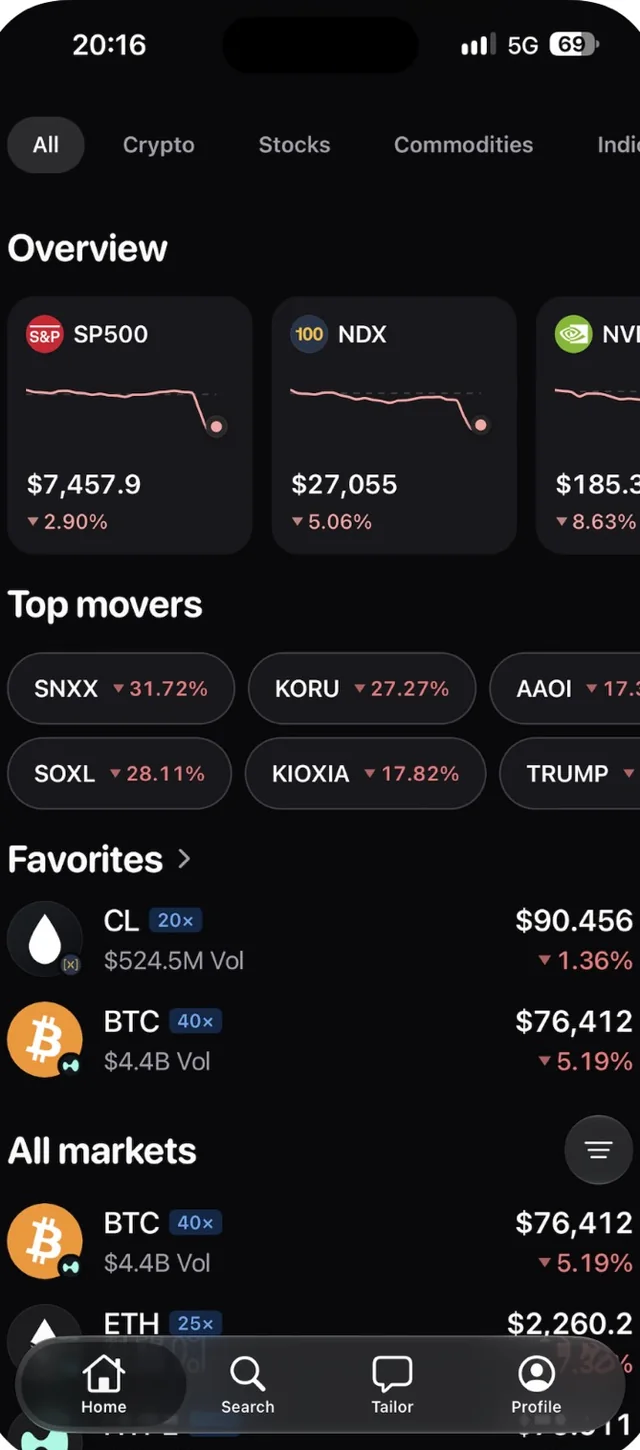 *Home tab on November 5, 2026. Stocks, indices and crypto in one list, with the leverage cap next to each ticker.*
| Market | Type | Max leverage I saw |
|---|---|---|
| BTC | Crypto perp | 40x |
| ETH | Crypto perp | 25x |
| CL (WTI crude), BRENTOIL | Commodity perp | 20x |
| SILVER | Commodity perp | 25x |
| SKHX, SNDK (single stocks) | Stock perp | 10x |
| SP500, NDX, NVDA | Index and stock perps | shown on the overview cards; caps vary by market |
Snapshot from the app on November 5, 2026. These are Hyperliquid caps and they change, so treat the table as a photo, not a spec sheet. A cap is also not a recommendation: at 20x, a move of roughly 5% against you consumes the whole margin.
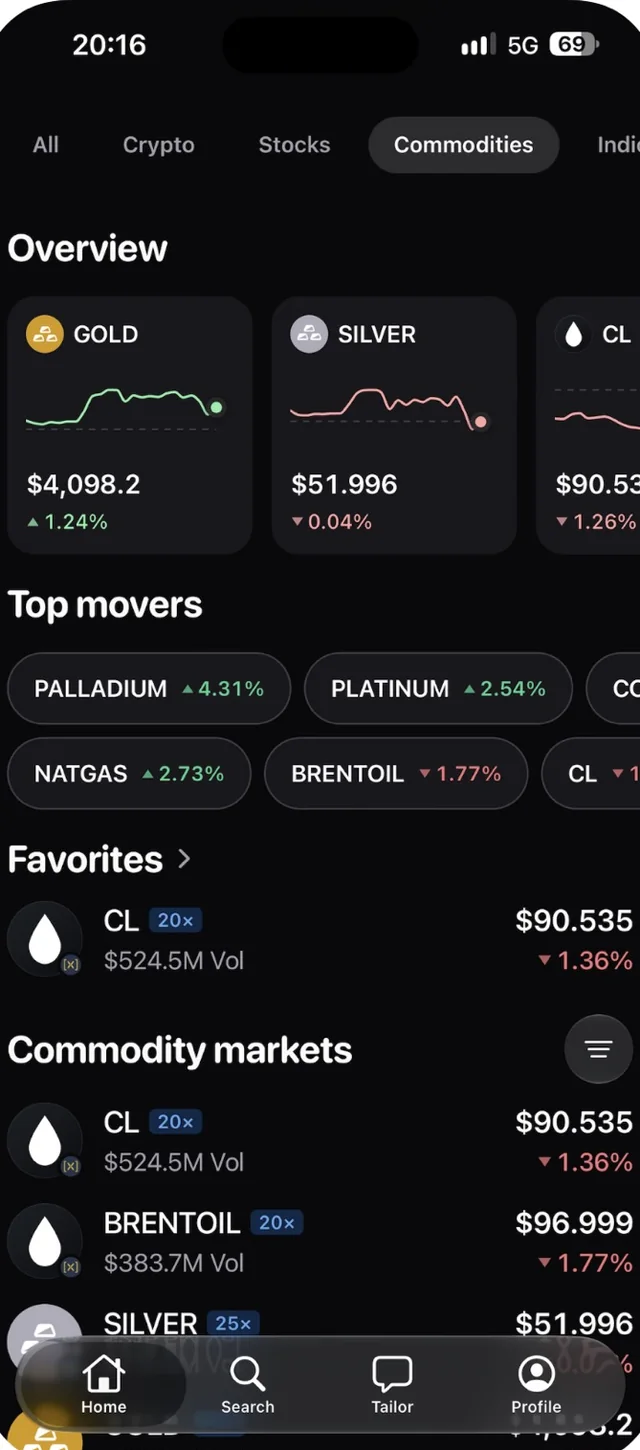 *Commodities tab: gold, silver, both crude benchmarks, natural gas and the platinum group metals, each with a leverage tag.*
Open any market and you get a candlestick chart with timeframes from a day to all-time, open interest, the funding rate, three tabs (Feed, Top Traders, About) and two buttons, Long and Short.
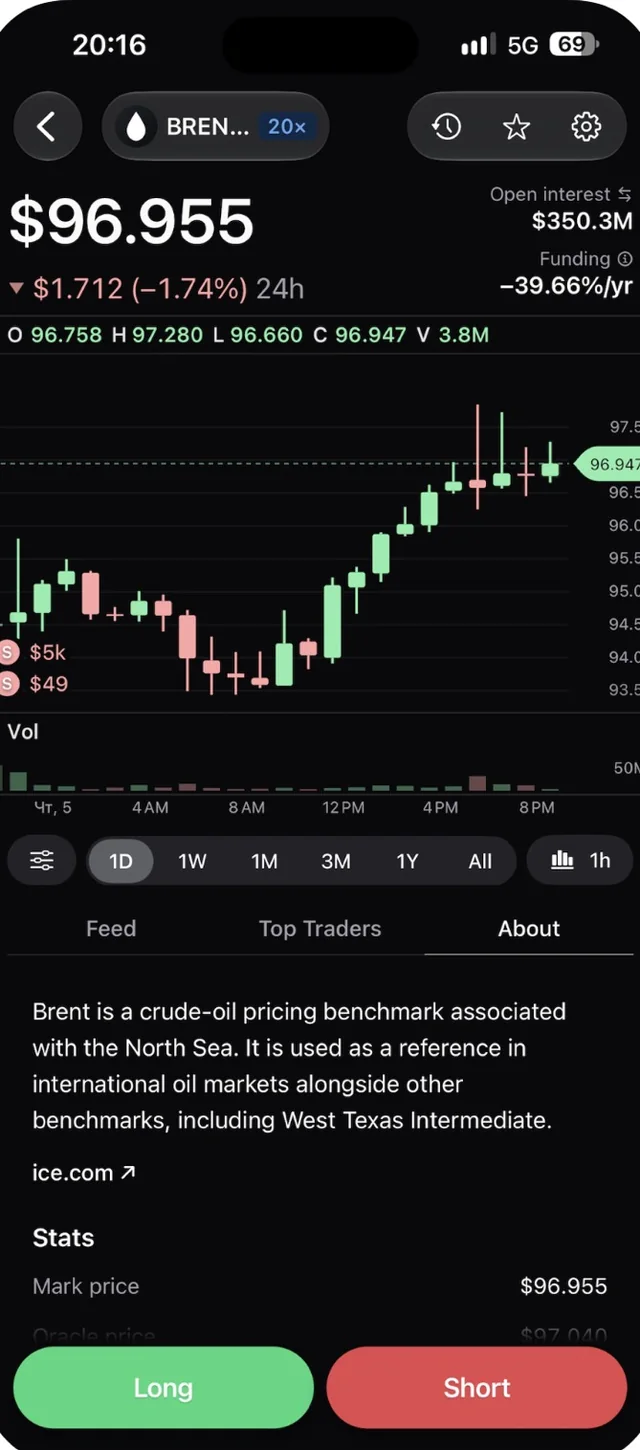 *The Brent perpetual on November 5, 2026. Funding is shown as an annualized rate; on that day it was deeply negative, which is a cost for shorts and a payment for longs, and it changes every hour.*
One detail I appreciated: the About tab names the benchmark and links to the source (ICE for Brent). It is a small thing, and most trading apps skip it.
The conversation: I asked Tailor to check an oil trade
I ran the scenario the Button team suggested, with the thesis most people had in October 2026: oil goes higher if the Middle East conflict gets worse. Three exchanges, screenshots untouched.
Round one: the thesis
I typed: I think oil is going higher if the conflict in the Middle East gets worse. What do you think?
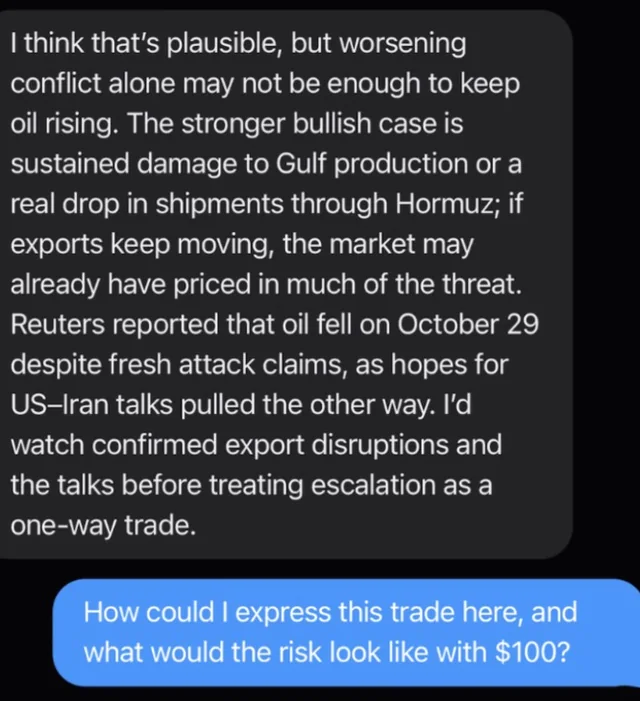 Tailor's first answer, October 30, 2026.
It did not agree with me to be polite. The answer separated fear of a cutoff from an actual cutoff, pointed to a Reuters report from October 29 where oil fell despite fresh attack claims because hopes for US–Iran talks pulled the other way, and named two things to watch before treating escalation as a one-way trade: confirmed export disruptions and the talks themselves.
That is the structure of a decent desk note. Two caveats from my side: the Reuters citation is text in the chat, not a link, so I could not open the article from inside the app; and the answer is only as current as the data the assistant has at that moment.
Round two: sizing the idea
I asked: How could I express this trade here, and what would the risk look like with $100?
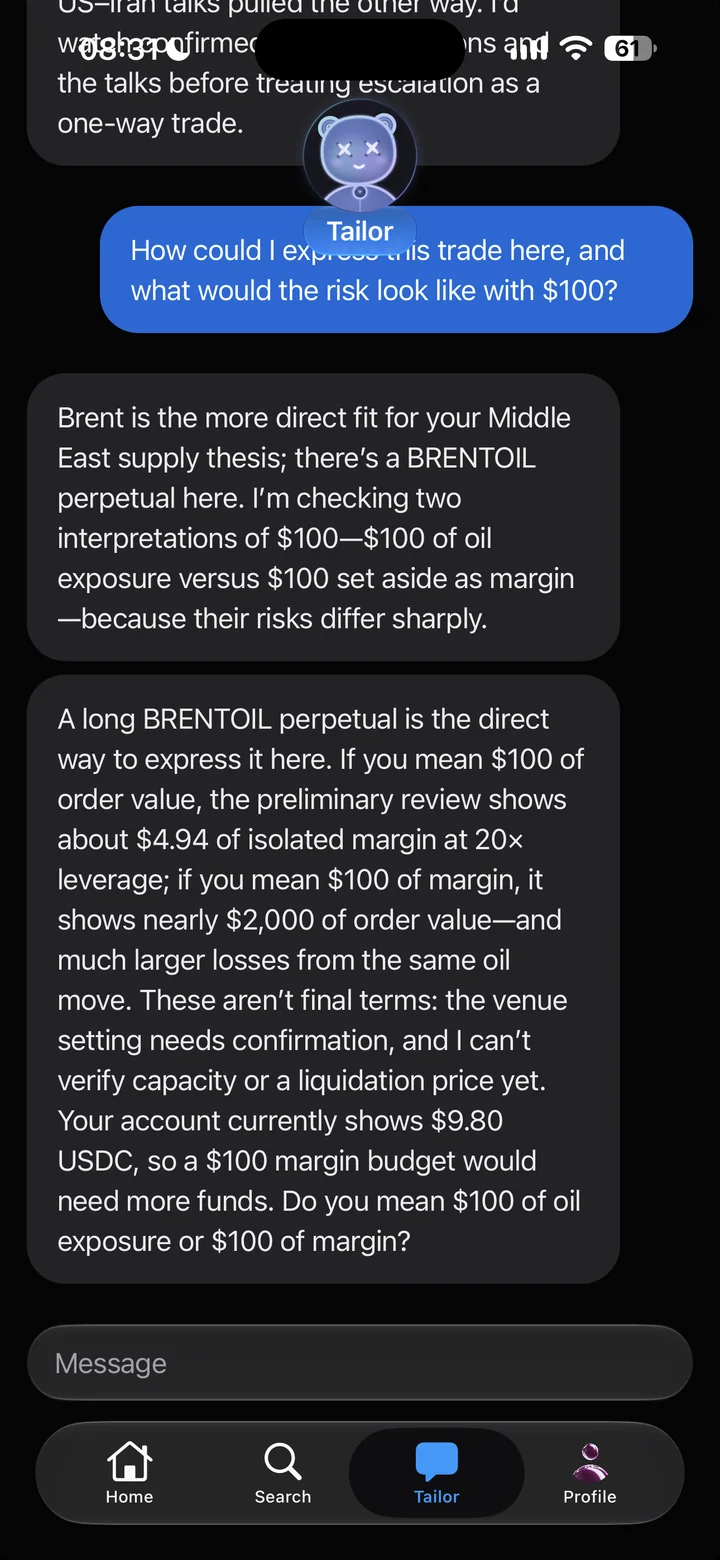 *The sizing answer. The question at the end is the part most beginners never ask themselves.*
Instead of a plan it gave me a fork. "$100" can mean two very different trades, and it priced both:
| What "$100" means | Margin you put up | Oil exposure | What a 1% move in oil does |
|---|---|---|---|
| $100 of order value | about $4.94 at 20x | about $100 | about $1 either way, before fees and funding |
| $100 of margin | $100 | nearly $2,000 at 20x | about $20 either way |
It also noticed my balance was $9.80, said a $100 margin budget would need more funds, and flagged that the liquidation price was not available until the venue setting was confirmed. The "1% move, about $1" line and the $4.94 figure are the assistant's numbers; the $20 column is my arithmetic from its $2,000 exposure figure.
Round three: the order card
I answered $100 of order value.
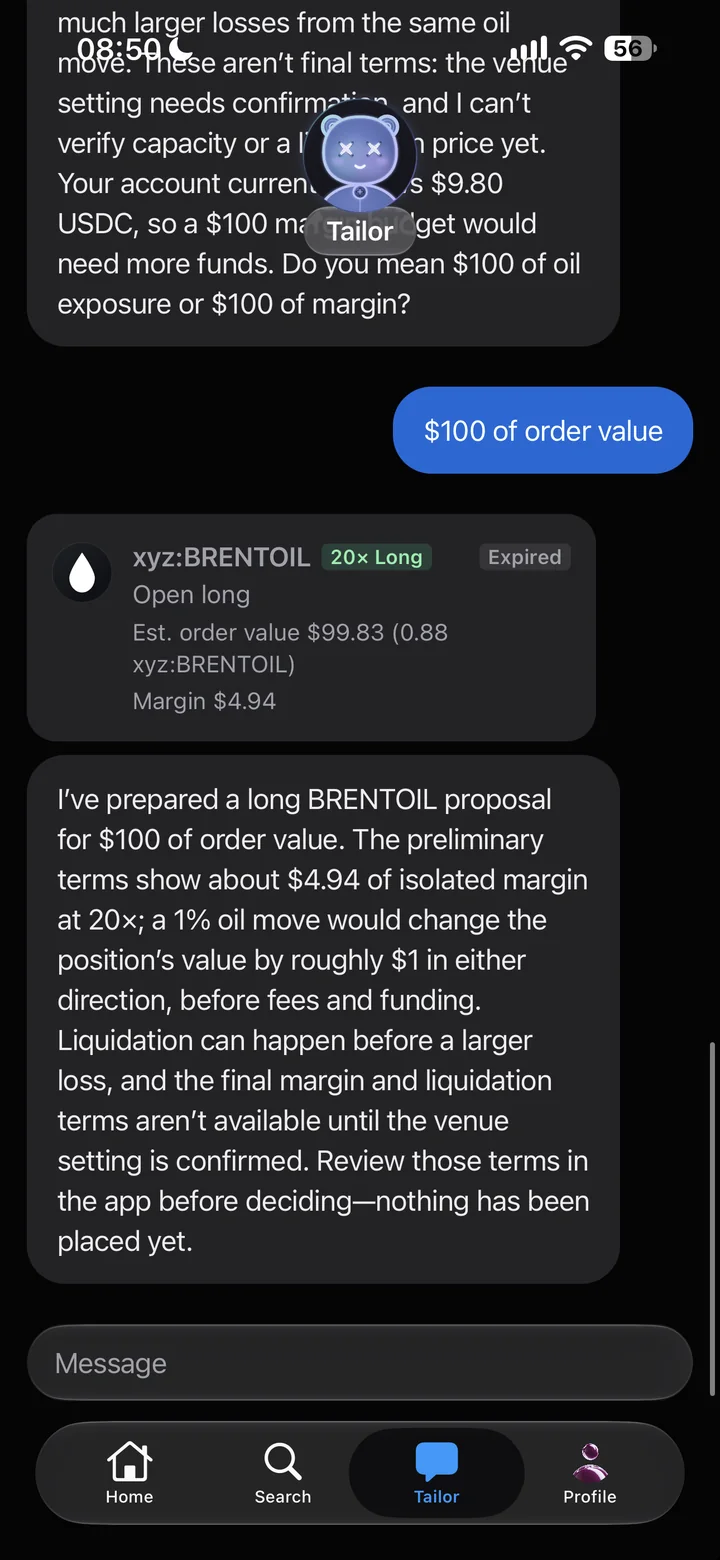 *The proposal card and the risk note under it. I never confirmed it; the Expired tag appeared because the proposal has a time limit and I let it lapse.*
The card showed BRENTOIL, 20x long, an estimated order value of $99.83 (0.88 contracts) on $4.94 of margin. The note under it repeated the risk in plain words, including that liquidation can come before a larger loss, and ended with the sentence that matters: nothing has been placed yet. Review in the app, then decide.
So the sequence is data, pushback, options, risk, then a card waiting for you. It is exactly the order most of us skip when trading from a headline.
Trading without the assistant
You can skip the chat entirely. The Long and Short buttons on any market open a standard order form.
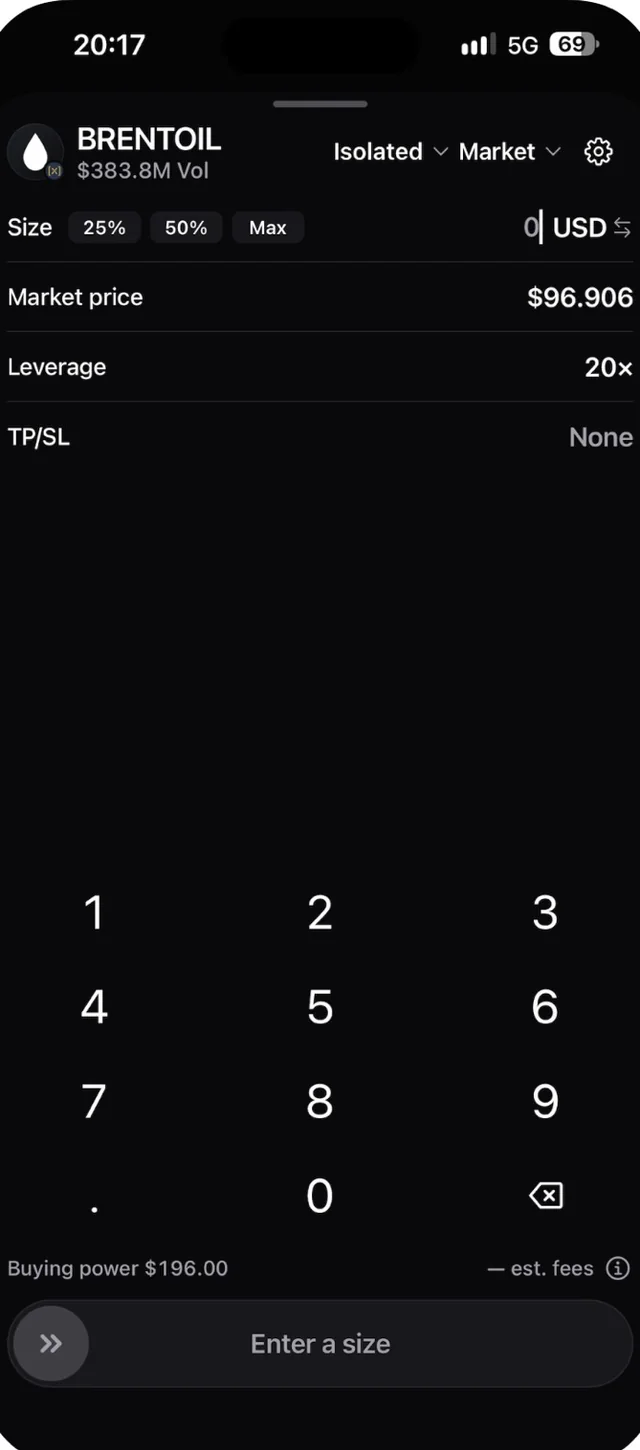 *The manual order form. Isolated or cross margin, market or limit order, size presets, leverage and take-profit/stop-loss before the order goes out. I did not enter a size.*
The form has what a perps trader expects: isolated or cross margin, market or limit, size presets, a leverage selector, TP/SL set before the order, and the buying power shown at the bottom. With $9.80 in the account and 20x, that was $196 of buying power, which is a useful reminder of what leverage actually means.
How do you get in, and what does it cost?
As of November 2026 Tailor is opening through a waitlist. You sign up with Google, Apple or email at button.xyz; the team then brings people onto the TestFlight beta in small groups with a one-on-one onboarding. The waitlist is open worldwide today, and the team told me to expect regional restrictions after launch, so check your own country before you plan around it.
| Plan | Price | With my link |
|---|---|---|
| Pro | $20 per month | $18 per month |
| Trader | $100 per month | $90 per month |
Prices and the 10% discount were confirmed to me by the Button team on October 20 and November 3, 2026. The company has not yet published what each tier includes; I will update this table when it does. My test account ran without a paid plan.
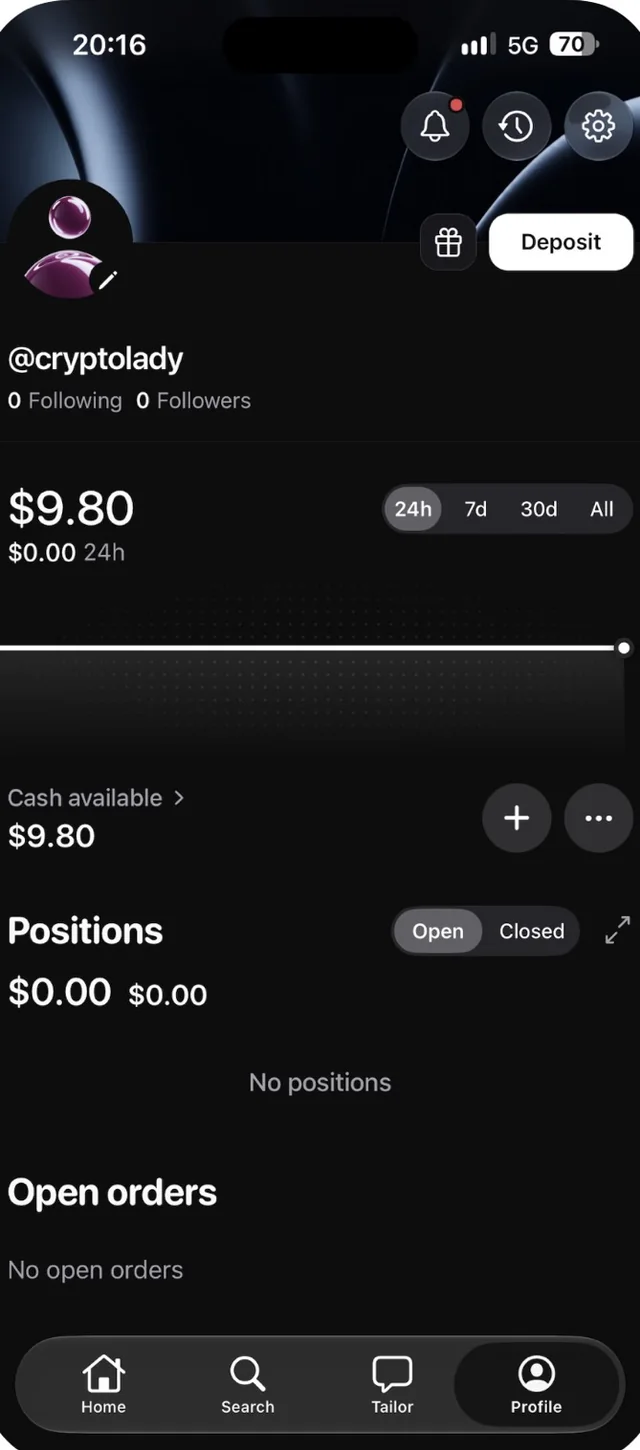 *Profile tab with the Deposit button and the $10 test balance (minus network fee). No positions, because nothing was ever placed.*
Funding is in USDC. My test deposit went in on Arbitrum to the address from the Deposit screen; it was on-chain within a minute and showed up in the app after a short delay. Hyperliquid runs on USDC, so there is no fiat on-ramp inside the app.
🔗 Join the Tailor waitlist — 10% off Pro and Trader through my link
What I liked and what I would want next
| Liked | Would want next |
|---|---|
| The assistant argues instead of agreeing; the order-value vs margin question is the single best thing in the app | Citations as links, not text, so a Reuters mention can be opened and checked |
| Risk is stated next to the trade, in dollars, before the card is confirmed | A liquidation price on the proposal card itself, not only after venue settings are confirmed |
| Stocks, indices, commodities and crypto in one list, no second app | Published plan details for Pro and Trader |
| The About tab names the benchmark and the source | A clear per-country availability list once the restrictions arrive |
| Nothing executes without a slide to confirm | An App Store listing; TestFlight plus waitlist is a barrier for a mainstream audience |
Who is it for?
It fits you if you already trade, you form opinions from news and you want something that pushes back on them before you size a position. The assistant is at its best as the colleague who asks "what exactly do you mean by $100" before you find out the hard way.
It does not fit you if you are new to leverage. Everything in this app is a perpetual contract: oil at 20x and Bitcoin at 40x can erase a small position on a single headline. A polite, well-reasoned assistant does not change that arithmetic, and an AI can be wrong about a market the same way an analyst can. If you want the mechanics of perps first, start with my guide to crypto perpetuals; if you want to compare wallet-native perps desks, I tested OneKey Perps on the same venue.
My verdict
Tailor is the first trading assistant I have used that behaves like a second opinion rather than a sales funnel. It said no to my thesis, made me define my own risk, priced two versions of the same trade and then stopped and waited. That is the right default for a leveraged product.
The caveats are real: early access only, plan details not yet public, citations you cannot click, and a venue where a $100 "trade" can quietly mean $2,000 of exposure if you phrase it wrong. Start with an amount you are comfortable losing, run your next idea through the chat before you place it anywhere, and read the risk line on every card. Even if you never execute inside the app, the pushback alone is worth the five minutes.
🔗 Join the Tailor waitlist — 10% off Pro and Trader through my link
Official resources
Written by Maria Klimenok · CRYPTO LADY. Paid partnership with Button; the waitlist link is a referral link. Screenshots taken on October 30 and November 5, 2026 from my own TestFlight account. Perpetual contracts track a price and give you no ownership of the underlying asset. Leveraged trading can wipe out your entire position. This article is educational and is not financial advice.
Running a campaign and want this kind of breakdown for your product? Formats and pricing · Telegram
Register via my link
Join the Tailor waitlist — 10% off Pro and Trader
Frequently asked
What is Tailor by Button?+
Tailor is an AI trading assistant inside the Button app on iPhone. You describe a market idea in plain words; it researches it, proposes how to express it and prepares an order card. Trades settle on Hyperliquid as perpetual contracts, and nothing is placed until you confirm.
Does Tailor trade on its own?+
No. In my test it drafted an order and stopped. Button's own wording is that nothing is placed until you slide to confirm, including the trades Tailor drafts for you.
What markets can I trade?+
Crypto, stocks, commodities and indices as perpetual contracts on Hyperliquid; the site also lists FX. On November 5, 2026 I saw caps of 40x on BTC, 25x on ETH and silver, 20x on crude oil and 10x on single stocks. The caps change with the venue.
How much does Tailor cost?+
Two paid plans were confirmed to me by the team: Pro at $20 per month and Trader at $100 per month, with 10% off for people who join through my waitlist link. The company has not yet published what each plan includes.
How do I get access?+
Through the waitlist at button.xyz with Google, Apple or email sign-in. The team brings new users onto the TestFlight beta in small groups with a one-on-one onboarding. The waitlist is open worldwide as of November 2026; regional restrictions are expected after launch.
How do I fund the account?+
With USDC. I sent a test deposit on Arbitrum to the address shown on the Deposit screen; it was on-chain within a minute and appeared in the app after a short delay. There is no card or bank on-ramp inside the app.
Is Tailor safe for beginners?+
The assistant explains risk well, but the instrument is leveraged perpetual futures: at 20x a move of roughly 5% against you consumes the entire margin, and liquidation can happen before that on fees and funding. If you have never traded perps, learn the mechanics first and start with an amount you can lose in full. ---
Want a review like this for your project?
YouTube review + Telegram + an evergreen blog article — EN · ES · RU-CIS markets. Real audience, verifiable results.