· 1701 words · 9 min
💸 How to Fund Bybit in 2026 — P2P and Crypto Deposit Walkthrough (No Fees, No Lost Funds)
Step-by-step Bybit funding guide for 2026 — P2P deposit at 0% fee, crypto transfer with the right network, Funding to Unified Trading transfer. Avoid the network-mismatch trap that costs people their money.
Honest review. Some links are affiliate links: same price for you, a small commission for the project.
⚡ Quick answer — fund Bybit without paying 3–5% in fees
Skip the «Buy Crypto with Card» landing page — that route charges 3–5% via third-party providers. Use P2P instead: 0% fee from Bybit, you trade directly with another person at the live market rate. If you already hold crypto in another wallet, the direct crypto deposit route is even simpler — just be very careful with the network you pick.
🎁 Sign up to Bybit and unlock up to $30,020 in Welcome Rewards
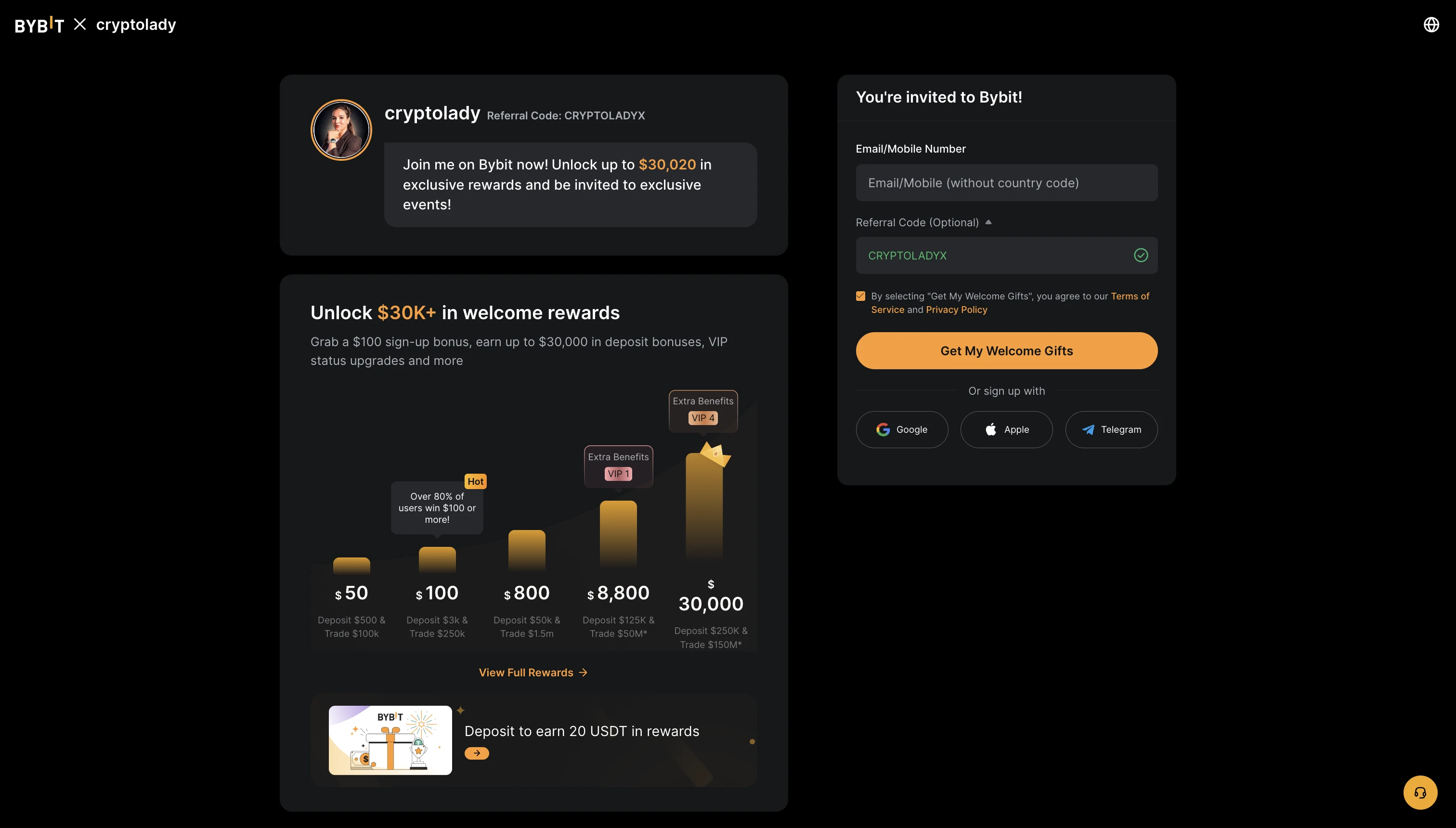
⚠️ Disclosure: this article contains an affiliate link. If you register through it I earn a commission and your fees stay the same — the Welcome Rewards are unlocked automatically. I funded a real Bybit account through both methods before writing this.
🩸 Why this guide now?
The «I tried to deposit and my bank blocked the card» message lands in my DMs almost every day. Same story across markets — banks flag direct crypto-card purchases as suspicious, providers stack 3–5% on top of the spread, and beginners pay 5–7% in invisible fees just to get their first $500 onto the exchange. That's a brutal start for someone who's just trying to learn.
The good news: there are two clean paths to fund a Bybit account in 2026 — P2P (best for first deposits from fiat) and direct crypto deposit (best when you already hold USDT elsewhere). Both bypass the card-deposit fee trap entirely. Both are explained below with the actual screens.
🛒 Path 1: P2P — the cheapest way to get USDT from fiat
P2P (peer-to-peer) is a marketplace inside Bybit where you trade directly with another person. They have USDT, you have local fiat — you transfer the fiat to their bank account, they release the USDT to your Bybit balance. Bybit holds the seller's crypto in escrow during the trade, so they can't disappear with your money.
Bybit fee on P2P: 0% on most pairs. You only pay the seller's spread over the market rate — usually 0.1–0.3% above mid-market. Total cost: typically under 0.5%, vs 3–5% on card deposits.
Step 1 — Find a reliable seller
Open the Bybit app → Buy Crypto → P2P Trading. Select your local currency at the top (USD, EUR, GBP, or whatever's local) and pick the coin — USDT is the standard.
You'll see a list of advertisers ranked by price. Don't just pick the cheapest — apply these three filters first:
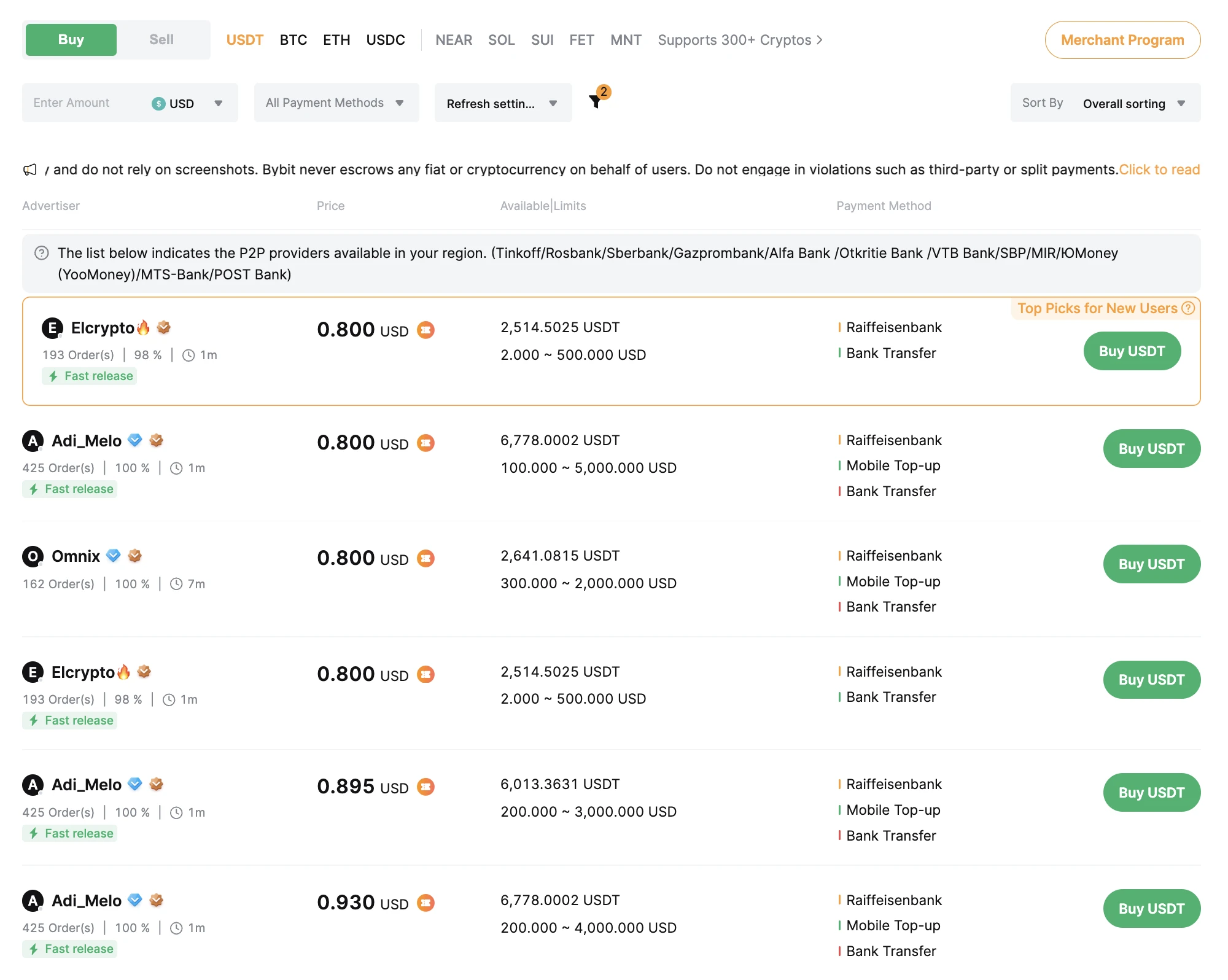
- Order count — at least 500 completed orders in the last month. This filters out new accounts that might be testing scams
- Success rate — strictly above 95%. Anything lower means disputes
- Limits — minimum trade amount fits your deposit size. Don't try to buy $100 from a seller with $500 minimum
By the way, pay attention to the verification badges next to the seller's name (Email, SMS, Identity Verification). Sellers with all three badges are higher trust — they've gone through Bybit's full KYC process.
Step 2 — Place the order
Click the seller's «Buy USDT» button. The order screen shows:
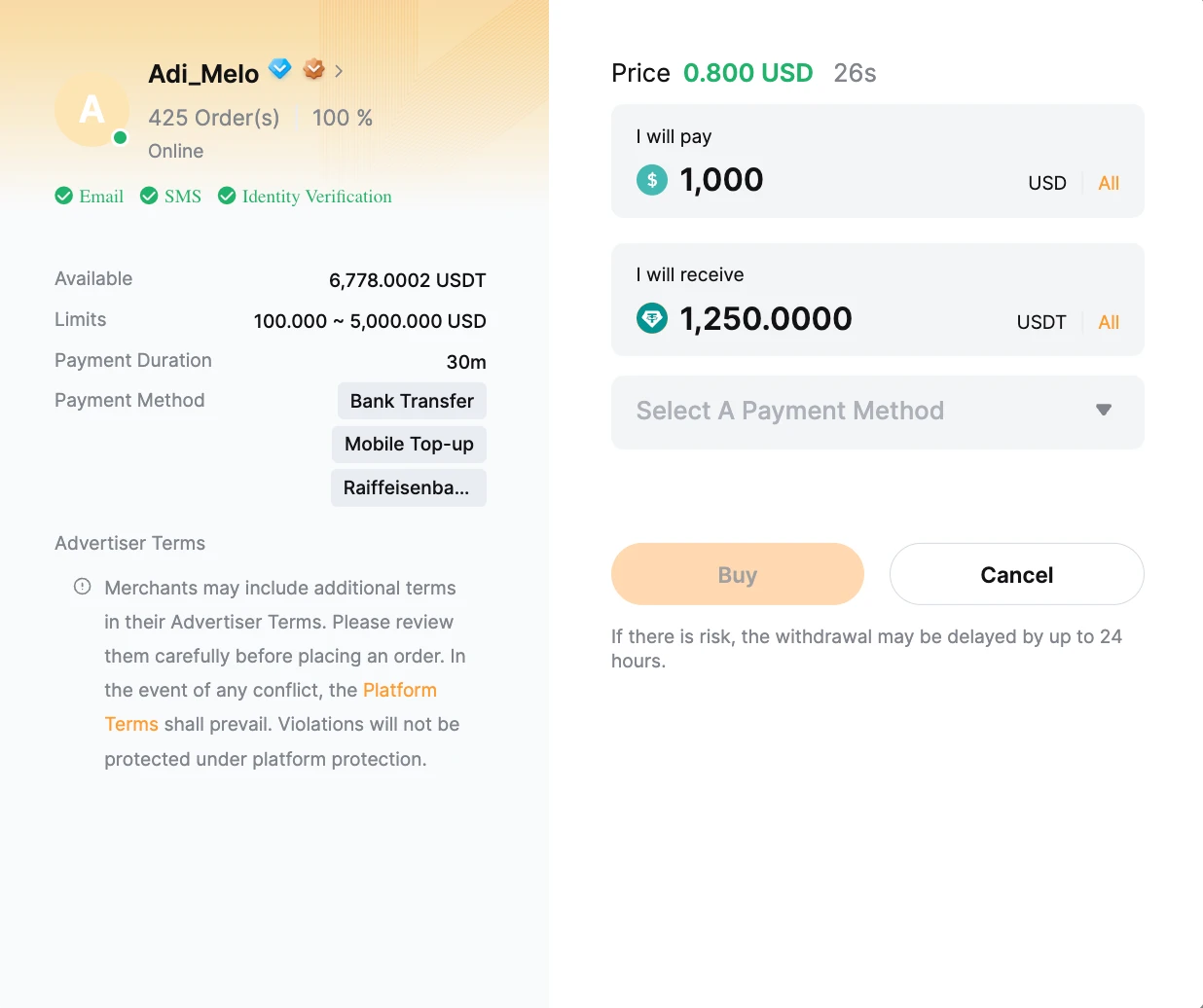
Enter the amount in your local currency, select the payment method from the dropdown (usually bank transfer), click Buy. From this moment Bybit locks the seller's USDT in escrow — your money is safe.
The golden rule of P2P: the bank account you transfer from must be in your own name, matching the name on your Bybit profile exactly. If the names don't match, the trade can be disputed and your account can be flagged. No exceptions. Don't use a friend's account, a company account, or a relative's account.
Step 3 — Send payment and confirm
Open your banking app, copy the seller's bank details from the Bybit order screen, and make a standard bank transfer. Once the money's sent, return to Bybit and click Payment Completed. Some sellers ask for a screenshot of the bank transfer in chat — just send it.
Within a few minutes, the seller verifies receipt and releases the USDT. Your Bybit funding balance updates instantly.
🔁 Path 2: Direct crypto deposit (if you already hold USDT elsewhere)
If you already have USDT (or BTC, ETH, etc.) in another wallet — your previous exchange, a hardware wallet, MetaMask — you can deposit directly. No fiat, no P2P, no name-matching rules.
Step 1 — Open the deposit screen
In the app: Assets → Deposit → select the coin (USDT in this example).
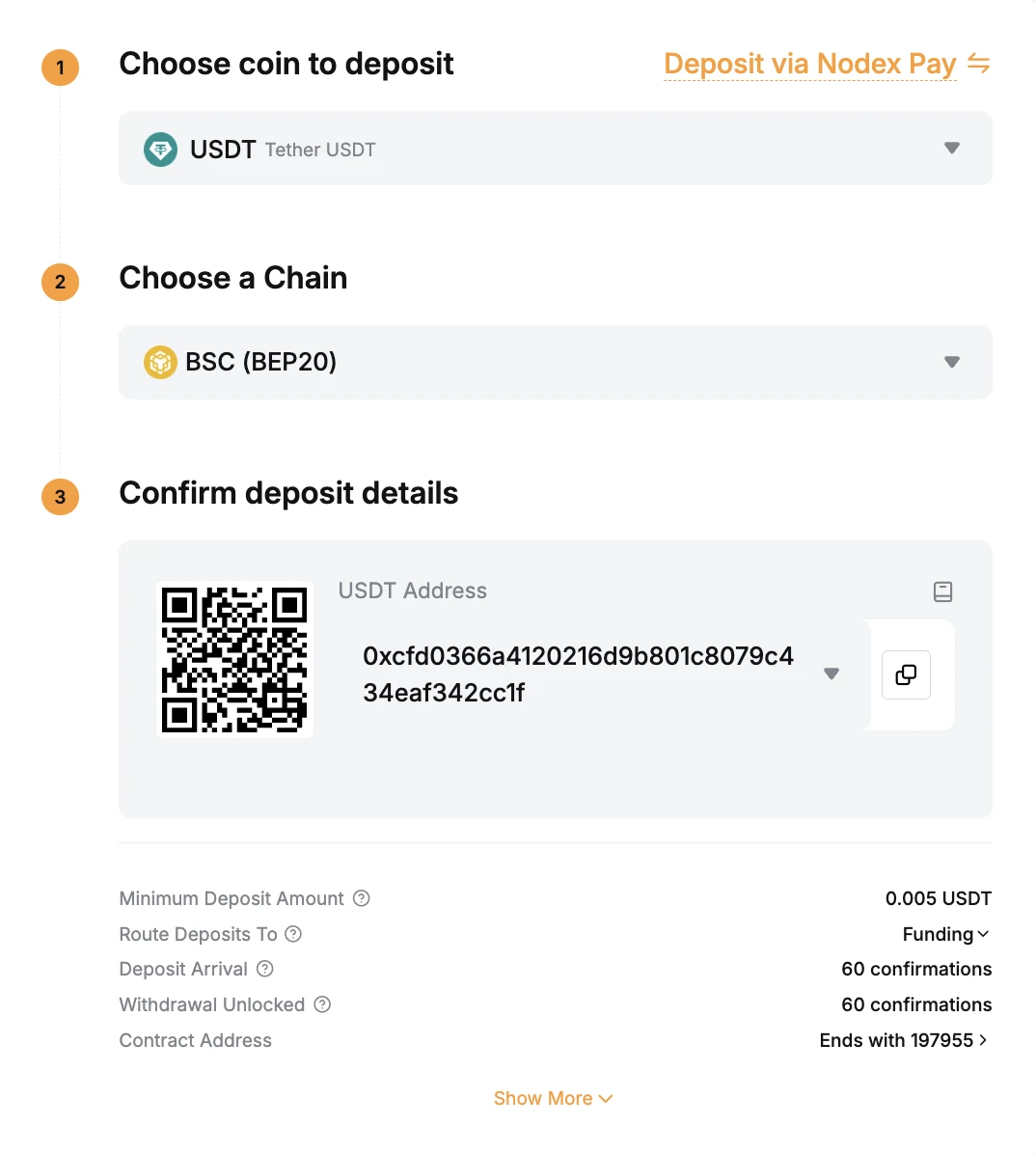
You'll see three sections: choose coin, choose chain, confirm deposit details (QR code + wallet address).
Step 2 — Pick the network (most important step)
This is where most people lose funds. Click the chain dropdown to see all supported networks:
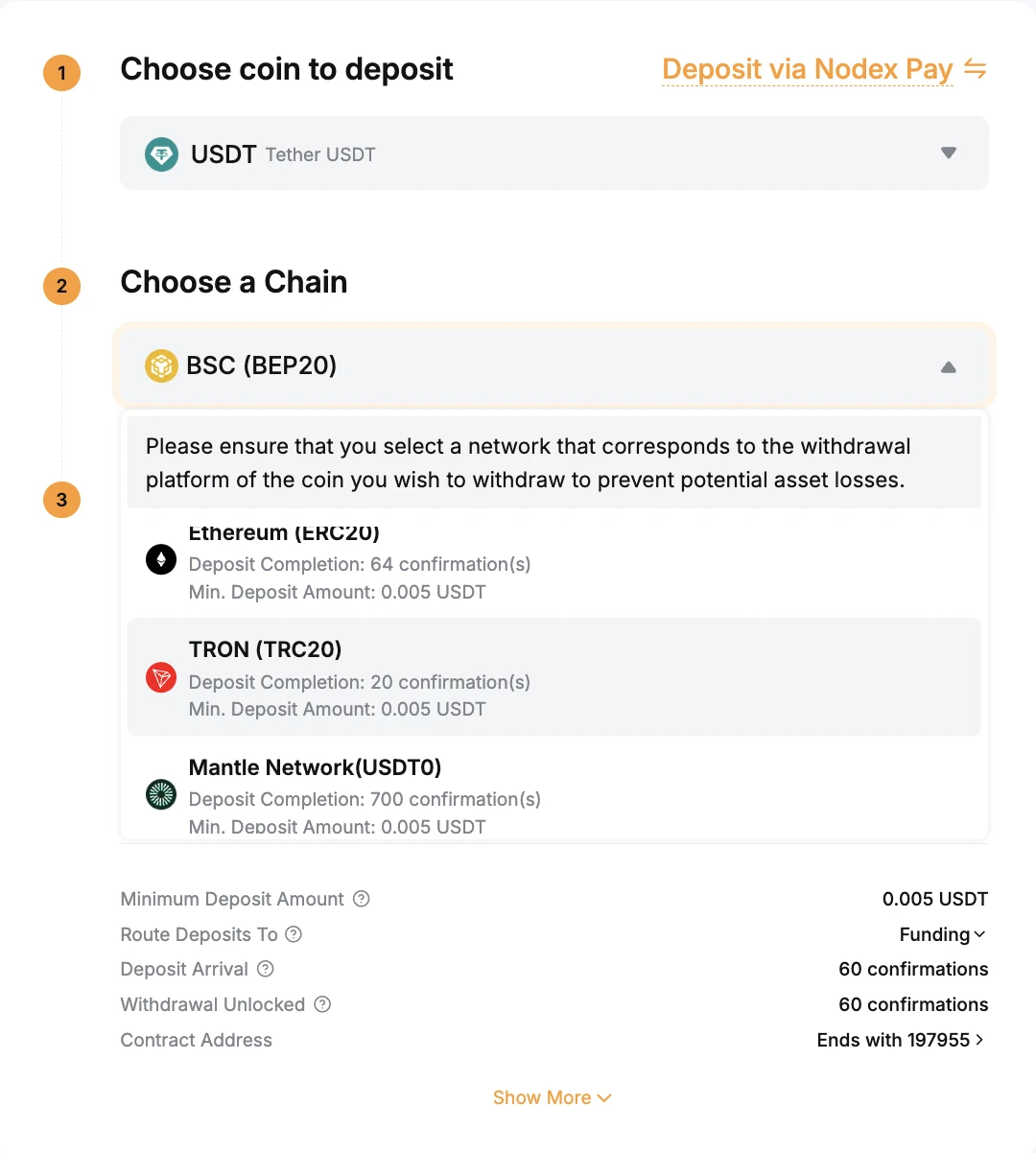
The available networks for USDT include:
- TRON (TRC20) — usually cheapest, 20 confirmations, fast
- BSC (BEP20) — also cheap, around 60 confirmations
- Ethereum (ERC20) — more expensive due to ETH gas
- Mantle (USDT0) — newer L2, 700 confirmations
For most users TRC-20 is the default — lowest fees on the sending side, fastest deposit on Bybit's side. But here's the rule that matters more than which network is «best»:
The sending network on your source wallet and the receiving network on Bybit must be identical. If you're withdrawing USDT from another exchange on BEP-20, you select BEP-20 on Bybit's deposit screen. Not «whichever is cheapest» — they must match.
⚠️ What happens if you mismatch: the transaction goes through (no error on either side), but the funds land at an address that doesn't exist in the receiving network's namespace. Bybit cannot recover them. Same address on TRC-20 vs ERC-20 looks visually similar —
0x...for EVM chains,T...for Tron — but they live in separate blockchain universes. Always copy the network from the deposit screen, then verify it on your withdrawal screen before confirming.
Step 3 — Send from your source wallet
Copy the address (or scan the QR code) on Bybit's deposit screen. Open your source wallet's withdrawal page, paste the address, select the matching network, enter the amount, and confirm. Depending on the network, the deposit lands in your Bybit Funding account in 5–30 minutes after the required confirmations.
🔄 Move funds from Funding to Unified Trading
After deposit, your USDT is in the Funding account. To actually trade — spot, futures, copy trading — you need to move it to Unified Trading.
In the app: Transfer → select direction (Funding → Unified Trading) → pick the coin → enter amount → confirm.
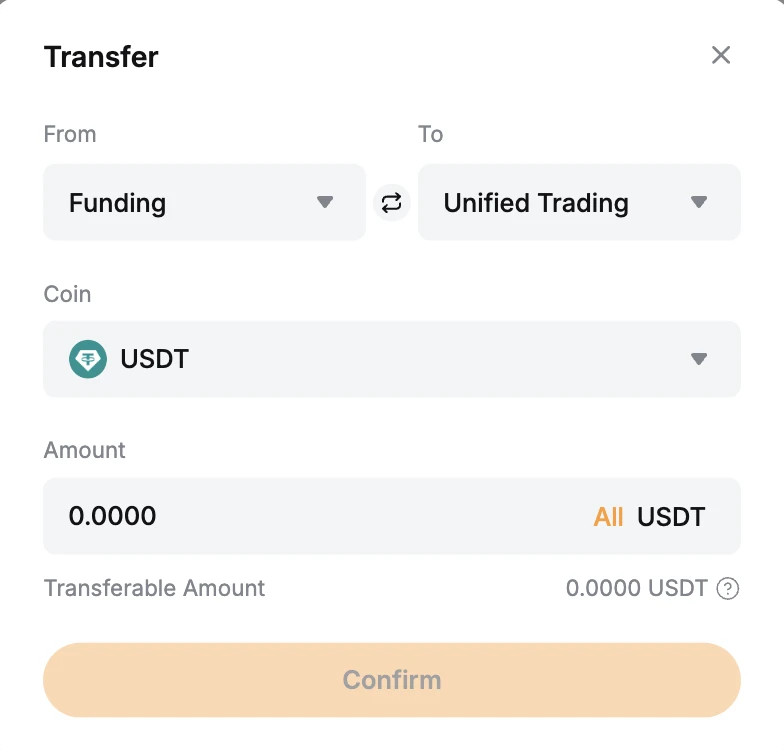
This is instant and free. No fees, no delays. Some traders keep their funds in Funding as a security buffer (no accidental futures trade if a button gets misclicked) and only transfer what they need for the next session.
🪪 KYC — what you actually need to verify
Bybit lets you start with minimal verification, but limits are tight. To unlock P2P with real volume and most fiat features, you need at least Standard identity verification:
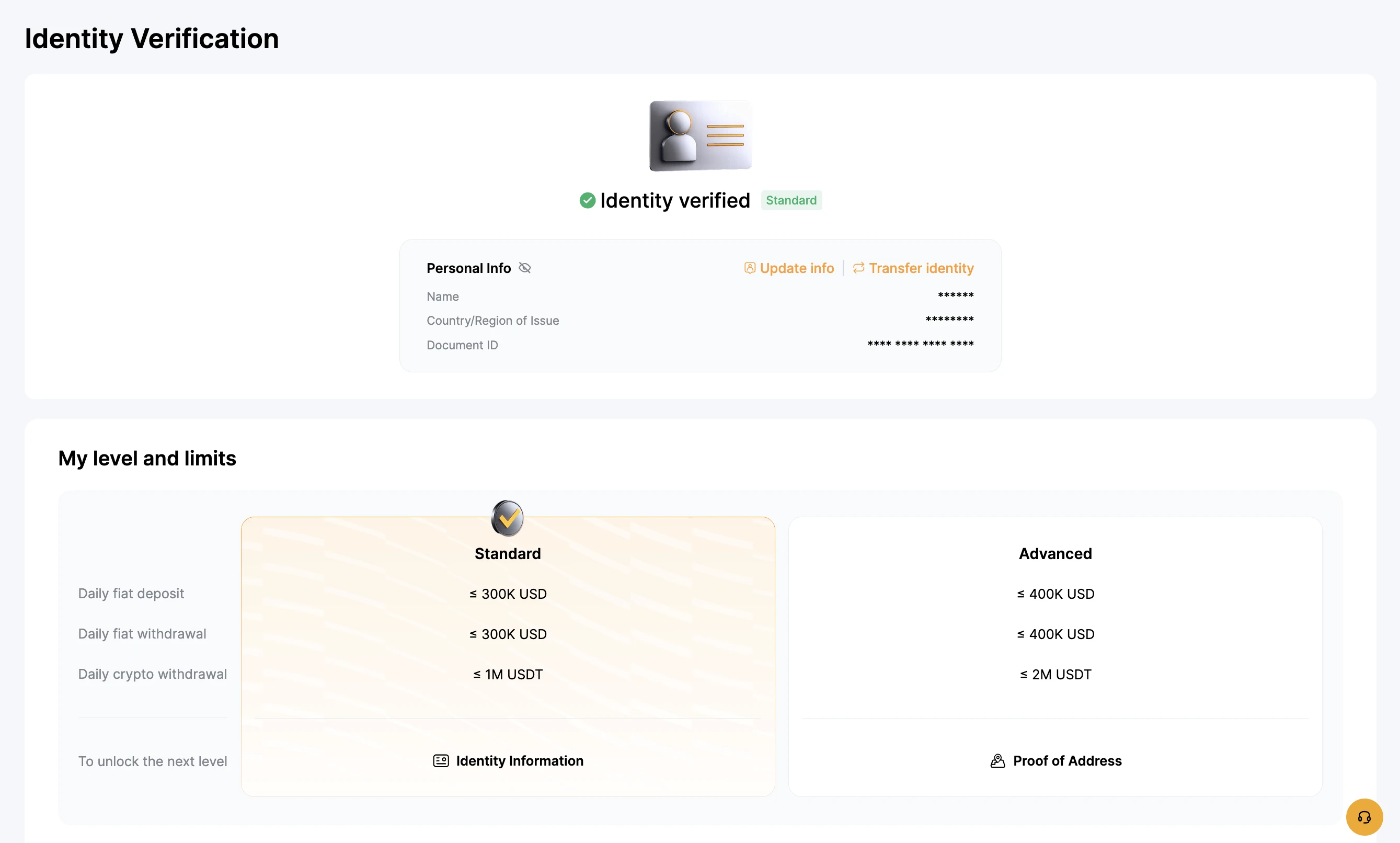
Standard tier (passport/ID + selfie, 5–15 minutes):
- Daily fiat deposit: ≤ 300K USD
- Daily fiat withdrawal: ≤ 300K USD
- Daily crypto withdrawal: ≤ 1M USDT
Advanced tier (adds Proof of Address):
- Daily fiat: ≤ 400K USD
- Daily crypto withdrawal: ≤ 2M USDT
For beginner deposits ($100–$5,000), Standard is more than enough. Advanced makes sense once you're routing serious capital through the exchange.
💡 First-time funding — practical recommendation
For your first deposit I recommend starting with $100–$200, not a full position. The goal isn't to make money on day one — it's to:
- Get comfortable with the deposit flow without the anxiety of large amounts
- Test the P2P process once with a small order
- Verify that Funding → Unified transfer works
- Place one or two small spot trades to learn the interface before touching futures
Once the mechanics feel familiar, scale up. Funding the account is the easy part — what you do with the capital afterward is where the actual risk lives. Futures with leverage can wipe an account in minutes. Funding tutorials don't teach risk management; that's a separate education.
If you're building a long-term position rather than active trading, consider moving holdings to cold storage instead of leaving large balances on the exchange. I've written a hands-on ERA Wallet review with the comparison against Ledger, Trezor, and Keystone — same principle that applies after Bybit funding.
🎯 Should you sign up?
If you're new and trying to figure out where to start with crypto, Bybit is a reasonable first exchange — deep liquidity, transparent P2P, KYC that actually works, and Welcome Rewards that compensate for the inevitable beginner mistakes.
Before you sign up, walk through the registration process here: How to Register on Bybit and Get Up to $30,050 in Bonuses. After registration, this guide picks up where that one ends.
For active futures trading with institutional custody (Fireblocks + Proof of Reserves) and a developed copy-trading layer, I also covered BloFin in a dedicated review — different positioning, different use case.
Sign up to Bybit — Welcome Rewards apply automatically when you register through the link.
Watch the full video walkthrough on YouTube — same content with the interface recorded live on screen.
Register via my link
Sign up to Bybit and claim up to $30,020 in Welcome Rewards
Frequently asked
Why is P2P cheaper than a direct card deposit?+
Direct card deposits on most exchanges charge 3–5% via third-party providers (Banxa, Moonpay, etc.). Bybit's P2P marketplace lets you trade directly with another person — Bybit charges 0% on most pairs, and you pay only the seller's rate (usually close to the market USDT price). For a $1,000 deposit that's the difference between paying $30–50 in fees vs paying $0.
How do I pick a safe P2P seller and avoid scams?+
Three filter criteria: (1) order count — look for sellers with at least 500 completed orders in the last month, (2) success rate — strictly above 95%, (3) limits — minimum trade amount fits your budget. Also check that they accept Email/SMS/Identity verification badges. New sellers with low order count are statistically higher risk even if their price looks better.
TRC-20 vs BEP-20 — which network should I use for USDT?+
Both are cheap and widely supported. TRC-20 (Tron) usually has the lowest fees and fastest confirmations — 20 confirmations on Bybit deposit. BEP-20 (BNB Smart Chain) is also low-cost, around 60 confirmations. ERC-20 (Ethereum) is more expensive due to ETH gas fees. The critical rule: the sending network on the source wallet and the receiving network on Bybit must match exactly. If you withdraw USDT from another wallet on TRC-20, you must select TRC-20 on Bybit's deposit screen.
What happens if I send crypto to the wrong network?+
In most cases — funds are lost permanently. Bybit cannot recover assets sent on a network different from the one selected for deposit. The address looks visually similar across networks but is technically different — sending USDT-ERC20 to a USDT-TRC20 address means the transaction goes through, but the funds sit at an unreachable destination. Always double-check: copy the network from the deposit screen, then verify it matches the withdrawal screen on your source wallet before confirming.
What's the difference between Funding and Unified Trading accounts?+
Funding is your 'wallet' — where deposits land and where withdrawals come from. Unified Trading is where actual trading happens (spot, derivatives, copy trading). After deposit, your funds are in Funding by default. To trade, you transfer them to Unified Trading via the in-app Transfer button — instant and free. Some users keep funds in Funding for security (no risk of accidental futures trade) and only move what they need.
How long does a P2P transfer usually take?+
From order creation to USDT in your account: typically 5–20 minutes. The actual bank transfer is the slowest step. Once you send the payment and click 'Payment Completed', the seller verifies the receipt (sometimes asks for a screenshot in chat) and releases the USDT from escrow. Sellers with high order counts usually release within minutes. The seller's funds are already locked in escrow when you open the order, so there's no risk of them taking your bank transfer and disappearing.
Is KYC required to use Bybit P2P?+
Basic P2P access works with minimal verification, but daily limits will be heavily reduced — for any serious volume you need at least Standard KYC verification. Identity Verified (Standard) gives 300K USD daily fiat deposit and 1M USDT daily crypto withdrawal limit. Advanced unlocks 400K / 2M. Verification is fast: passport or ID + selfie, usually approved in 5–15 minutes.
Want a review like this for your project?
YouTube review + Telegram + an evergreen blog article — EN · ES · RU-CIS markets. Real audience, verifiable results.